
Every early SaaS team dreams of landing a big customer. Sometimes that customer is exactly what you need. Sometimes they quietly take over your roadmap, your support queue and your servers, while paying a fraction of what that's worth.
That second kind is a whale. This guide covers how to tell a whale from a genuinely valuable account, the warning signs to watch for, a simple usage-to-revenue check, and the pricing and roadmap fixes that stop one customer steering the ship. There's a free whale scorecard further down.
What is a whale customer?
In this guide, a whale is a customer whose demands are out of proportion to the revenue they bring. That might be usage, support load, infrastructure cost, or feature requests that only they need.
A whale is not the same as a large account. A customer paying $200,000 a year who uses the product like everyone else, just more of it, is a great customer. A customer paying $3,000 a year who uses more resources than the rest of your base combined, and wants a custom feature every fortnight, is a whale.
The question isn't "how big are they?" It's "is what they get, and what they ask for, in line with what they pay?"
The story that named the problem
Back in 2015, the team at Receptive published a short founder war story called SaaS startup mistakes #1: watch out for whales (the original page is offline; that link is the archived copy).
In short: a previous startup of the founder's landed a customer with far more volume than everyone else combined, but priced on a plan that didn't reflect it. The team scaled the platform, then spent weeks building features only that customer needed while other customers waited. When the founder finally raised price, the customer refused and left within months, leaving behind features most users would never touch.
The lessons still hold: price on value, have the money conversation early, and don't let fear of losing one account make your product decisions for you.
Why whales are so easy to fall for
Whales rarely look like a problem at first. They look like validation.
- They're impressive. A recognisable logo or huge volume feels like proof the product works at scale.
- They're articulate. Big customers often send detailed, well-argued requests with a business case attached. That reads as high-quality feedback.
- They're loud. One account emailing weekly feels like more demand than twenty accounts that quietly use the product.
- They're scary to lose. Losing a big name feels like a disaster, even when its revenue share is small.
- They promise more. "If we land them, we'll land others like them." Sometimes true. Often not.
None of these is a reason to say no. They're reasons to check the numbers before saying yes.
Warning signs you've got a whale
Watch for these, especially in combination:
- One account drives a large share of feature requests. If a single customer is behind, say, a quarter of open requests, your roadmap is being written by them.
- Their value is far beyond their price. They're running a core part of their business on a plan priced for casual use.
- Their cost to serve is out of line. Infrastructure, support tickets or onboarding time well above any other account at similar revenue.
- The requests are custom. Features that only make sense for their workflow, data model or integration.
- They resist pricing conversations. Pushing back on any change to price while asking for more is a strong signal they're not in it for a fair long-term deal.
- They hint at building it themselves. "We could just build this in-house" is often a negotiating tactic, and sometimes a preview of churn.
- Your team's calendar has changed. Sprints, standups and late nights increasingly revolve around one name.
The usage-to-revenue check
You don't need a model. You need a rough ratio.
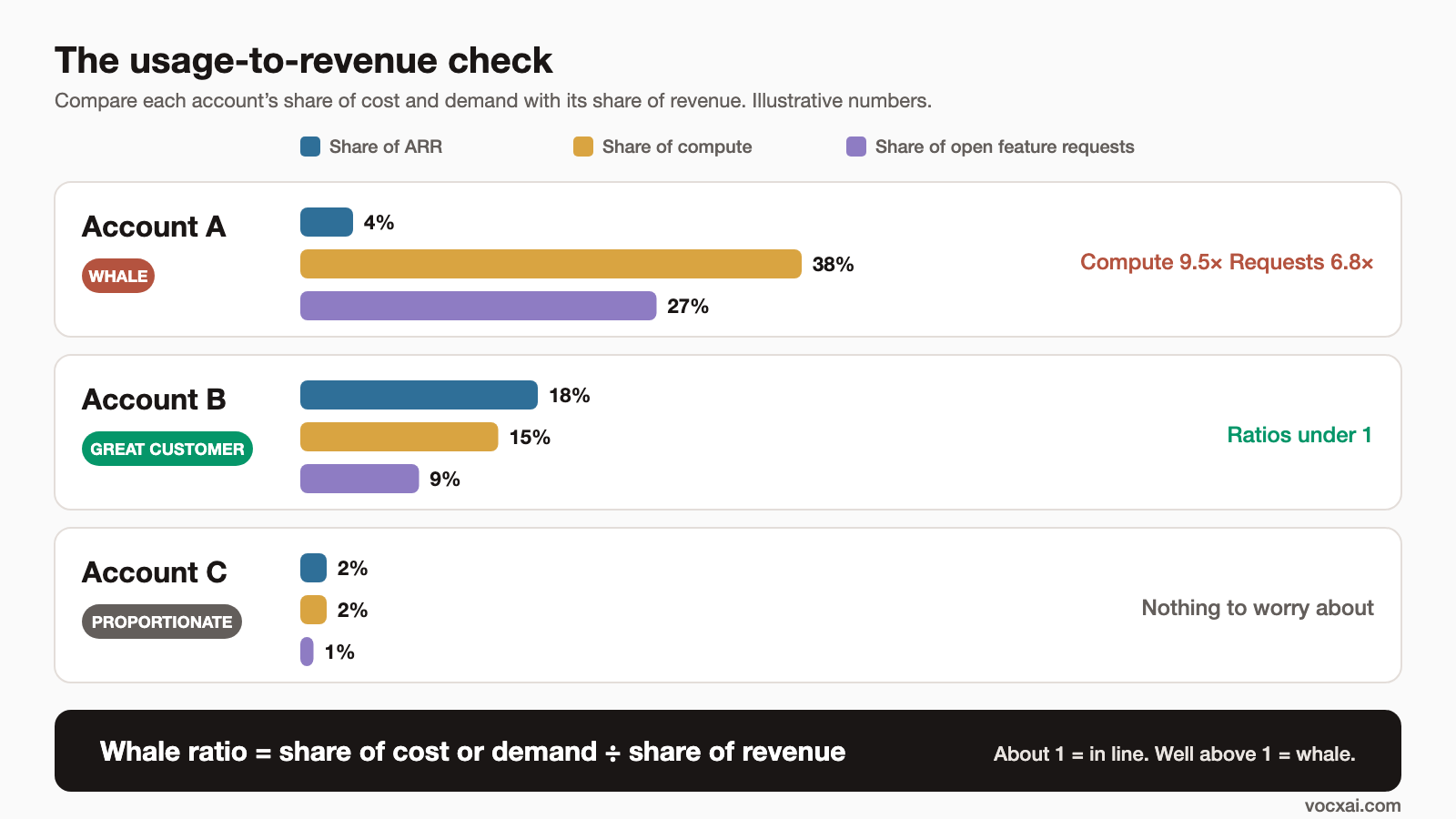
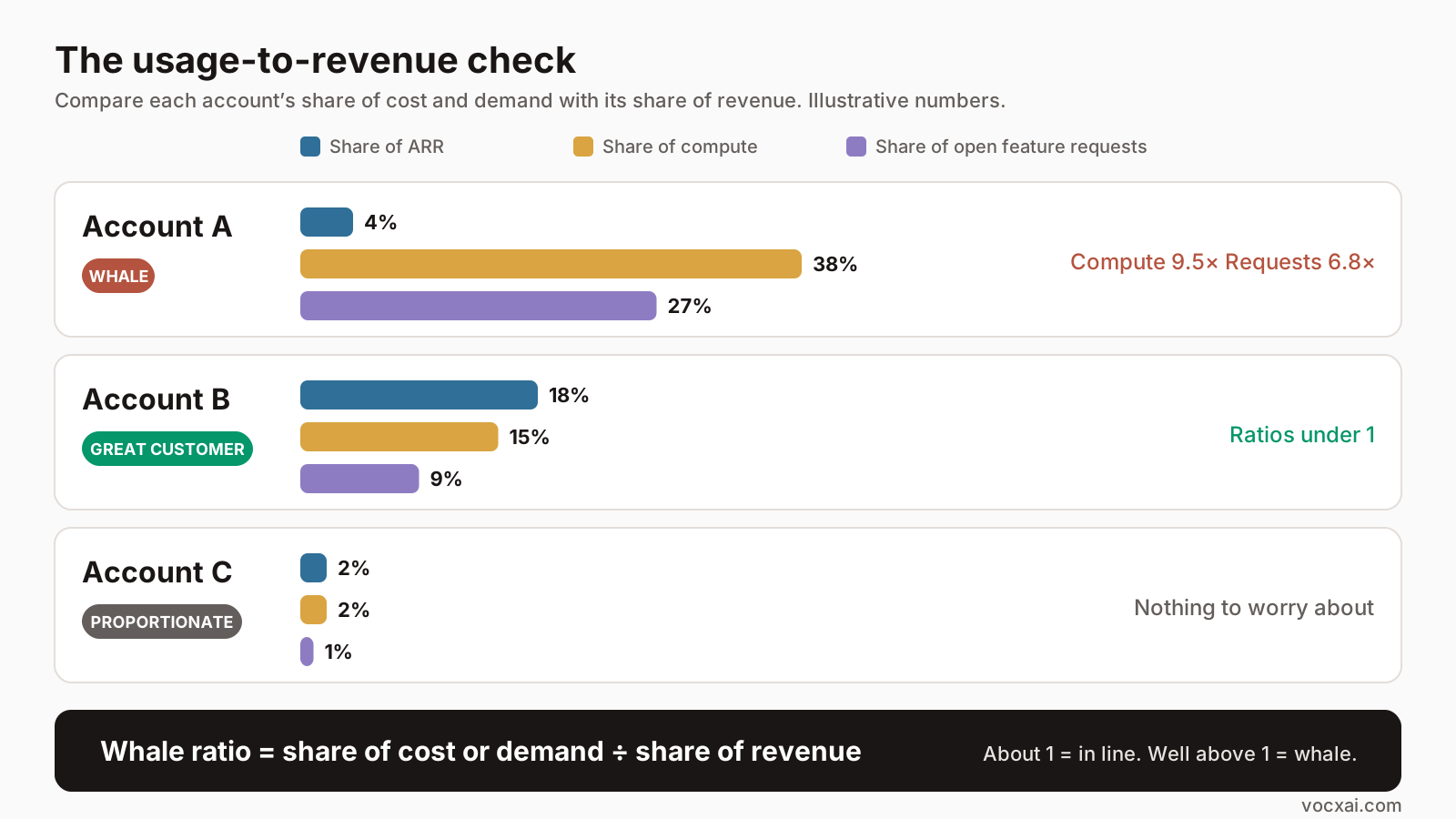
For each of your largest accounts by usage or by request volume, compare its share of revenue with its share of the things that cost you:
Whale ratio = share of cost or demand ÷ share of revenue
A ratio around 1 means they're paying roughly in line with what they use. Well above 1 means they're getting more than they pay for.
Hypothetical example. These numbers are illustrative only, not from any real company.
| Account | Share of ARR | Share of compute | Share of open feature requests | Share of support tickets |
|---|---|---|---|---|
| Account A | 4% | 38% | 27% | 22% |
| Account B | 18% | 15% | 9% | 12% |
| Account C | 2% | 2% | 1% | 3% |
- Account A's compute ratio is 38 ÷ 4 = 9.5, and its request ratio is 27 ÷ 4 ≈ 6.8. That's a whale.
- Account B is your biggest payer, with ratios under 1. That's not a whale. That's a great customer.
- Account C is small and proportionate. Nothing to worry about.
This is why "big customers are bad" is the wrong lesson. Account B is exactly who you want more of. Account A is the problem.
Pricing fixes
Most whales are a pricing problem first. If the price matched the value, the demands would be fine.
- Pick a value metric. Charge on the thing that grows with the value customers get: transactions, records, seats, projects or usage. A flat price invites whales.
- Add usage tiers or fair-use limits. Make it clear where a plan ends, so heavy use naturally moves to a higher plan.
- Have an enterprise plan. Custom work, dedicated support and SLAs should live on a plan priced for them.
- Charge for custom features. Paid development or a platform fee is fair when a feature only serves one account.
- Raise it early. The longer you deliver above-and-beyond service for free, the more it becomes the expected baseline. The best time for the price conversation is when usage first jumps.
- Grandfather carefully. If you change pricing, give notice and a clear path. Surprising a whale rarely ends well.
Roadmap fixes
Even with fair pricing, you need guard rails so one account can't set your priorities.
- Count accounts, not messages. Twenty emails from one customer is one data point. Track how many distinct accounts want something.
- Weigh by revenue, but not blindly. Revenue matters, and it should shape priorities. Our guide to weighting feature requests by revenue covers how. Just make sure the weighting reflects revenue actually at stake, not the size of the logo.
- Check against your goals. A request only gets priority if it moves a goal you've set: retention, expansion, activation, or entering a segment. "A big customer asked" isn't a goal.
- Use a scoring framework. An evidence-based ICE score makes it obvious when one account's request is high on noise and low on impact. MoSCoW helps you say "Won't (this time)" out loud.
- Cap single-account work. Some teams set a rough limit, such as no more than a set share of a sprint for any one account's requests unless it's paid work. Pick a number that suits your stage.
- Ask "who else?" Before building, find at least a few other accounts with the same underlying problem. If there are none, it's a custom feature.
When a whale is worth keeping
Not every whale should be priced out or let go. Some are worth leaning into:
- They're a design partner for a segment you genuinely want to enter.
- They're willing to pay, or commit to pay, once the feature ships.
- Their requests are early versions of problems the rest of your base will have.
- They're stressing your platform in ways you'd have to fix anyway. Scaling just in time, when a real customer needs it, beats optimising too early.
The difference is that you choose this on purpose, with a price and an end date, rather than drifting into it.
Free whale scorecard template
Use the scorecard to check any account you suspect is skewing your priorities. Score each signal from 0 (not present) to 2 (strongly present). A total of 8 or more out of 20 is worth a conversation about pricing or scope.
| Signal | What to check | Score (0-2) |
|---|---|---|
| Request share | Share of open requests vs share of ARR | |
| Value vs price | Business-critical use on a low-tier plan | |
| Cost to serve | Compute, storage or support well above revenue share | |
| Custom asks | Requests that only fit their workflow | |
| Pricing resistance | Pushes back on any price change | |
| Build-it-ourselves threats | Hints at replacing you in-house | |
| Team time | Share of recent sprints spent on this account | |
| Goal fit | Requests don't map to your stated goals | |
| Segment fit | They're outside your target customer profile | |
| Who else? | No other accounts share the underlying problem |
Download the scorecard as a spreadsheet (XLSX) or CSV. The spreadsheet adds the total and a result for you, and a second sheet that calculates the whale ratio for each account.
How VocxAI helps
VocxAI is the AI agent that keeps improving your product: customer intelligence on autopilot, tracked against your goals.
It combines customer feedback, product usage and ARR in one place, so it can flag when one account's requests are skewing priorities against your goals. Instead of finding out months later that a sprint went to one customer, you see the request share, usage and revenue side by side while you're still deciding.
FAQ
What is a whale customer in SaaS?
A customer whose usage, support load or feature demands are far out of proportion to the revenue they bring. It's about the mismatch, not the size.
Are big customers bad for a SaaS business?
No. Large customers that pay in line with the value they get are often your best customers. The risk is a customer who takes far more than they pay for, or who steers the roadmap away from everyone else.
How do I know if one customer is skewing my roadmap?
Compare their share of open feature requests and team time with their share of revenue. If the first is many times the second, they're likely skewing it.
How should I price to avoid whales?
Charge on a value metric that grows with use, set clear plan limits, and offer an enterprise plan for custom work and dedicated support. Raise pricing early, when usage first jumps.
Should I build features for a single large customer?
Only on purpose: if they pay for it, if it matches your goals, or if other accounts share the same underlying problem. Otherwise treat it as custom work.
What happened in Receptive's original whale story?
A founder described a customer with huge volume on a low-priced plan, who drove weeks of custom work, refused a price increase and churned within months. The archived post is worth a read.
See how VocxAI builds this for you
VocxAI is the AI agent that keeps improving your product: it finds the patterns in customer feedback from any tool you use, works out what's wrong in your code, has AI agents build the fix for your approval, then checks whether it worked and acts on what it learns.
Sign up for free