
MoSCoW prioritisation is a simple way to agree what goes into a release. Every item goes into one of four buckets: Must have, Should have, Could have or Won’t have (this time). It’s popular because anyone can follow it, from engineers to execs to customers.
The trouble is that MoSCoW has no built-in way to decide which bucket something belongs in. So the loudest voice wins, and half the backlog ends up as a Must. This guide covers the method, the 60/20/20 rule that keeps it honest, and how to use revenue, usage and codebase evidence to decide categories. There’s a worked example and a free template too.
What is MoSCoW prioritisation?
MoSCoW comes from the DSDM agile method. The lower-case o’s are just there to make the word pronounceable. The four categories:
- Must have: without it, the release fails. It isn’t legal, safe or viable, or it doesn’t deliver its core purpose. If one Must slips, you’d rather delay the release than ship without it.
- Should have: important and valuable, but the release still works without it. There may be a workaround, even a painful one.
- Could have: nice to have. Small wins that improve the experience, and the first things dropped if time runs short.
- Won’t have (this time): explicitly out of scope for this release. Not “never”, just not now. Writing these down is half the value, because it stops the same debate happening every week.
The 60/20/20 rule
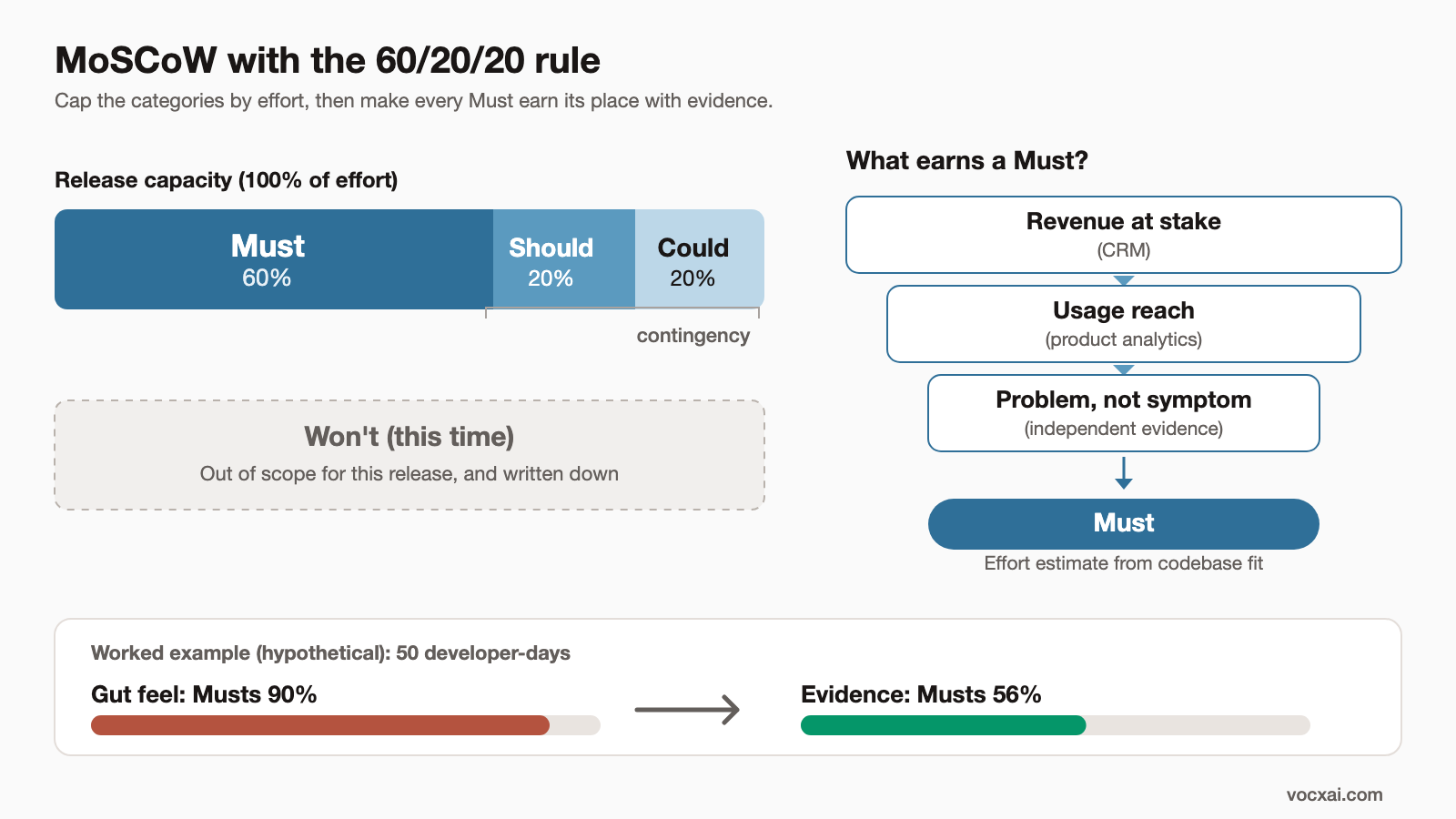
MoSCoW only works if the categories are capped. The common guidance (from DSDM) is:
- Musts: no more than about 60% of the total effort available.
- Shoulds: around 20%.
- Coulds: around 20%. This is your contingency.
The logic is simple. Estimates are always wrong in some direction. If 90% of your capacity is Musts and the work overruns by 15%, you miss the deadline with no room to move. With 60% Musts, the Coulds (and if needed the Shoulds) absorb the overrun, and every Must still ships.
Measure the split in effort (developer-days, points), not in number of items. Five small Musts and one huge Must can look balanced by count and still blow the budget.
How to decide what’s really a Must
This is where most teams struggle. “Must” ends up meaning “someone important wants it.” A better test uses evidence:
1. Revenue at stake
Check the CRM. Is there ARR tied to this: a renewal that names it, a deal blocked by it, an account at risk? A named renewal or a stalled enterprise deal is strong Must evidence. A large number of small requests is usually a Should.
2. Usage reach
Product analytics like Amplitude will show how many active accounts touch the workflow. If a third of your active accounts hit a painful workaround every week, that’s real. If a feature is asked for but the related area is barely used, be sceptical.
3. Independent evidence, and problem vs symptom
Do support tickets, sales calls, reviews and usage data point the same way? One channel isn’t enough for a Must. Then ask: is this request the underlying problem, or a symptom of it? “Custom dashboards” might really be “I can’t see overdue invoices.” Solve the problem with the smallest change that works.
4. Codebase fit
Ask engineering how well the change fits the existing code. Is there a pattern to reuse? How many services does it touch? Effort estimates should come from someone who has looked at the code, because those numbers decide whether your 60/20/20 split holds.
A useful rule: if you can’t write one line of evidence for why something is a Must, it isn’t one.
Worked example: a quarter’s release
This is a hypothetical example. A B2B invoicing app (about $3M ARR) has a 10-week release with 50 developer-days of capacity. Eight candidate items are on the table.
Round 1: categorised by gut feel
| Item | Effort (dev-days) | Category |
|---|---|---|
| Custom dashboard builder | 15 | Must |
| Salesforce sync | 14 | Must |
| SAML single sign-on | 10 | Must |
| Dark mode | 6 | Must |
| Bulk CSV export | 4 | Should |
| Audit log | 6 | Won’t |
| Slack notifications | 4 | Won’t |
| “Days overdue” dashboard metric | 3 | Not considered |
| Category | Effort | Share of 50 days |
|---|---|---|
| Must | 15 + 14 + 10 + 6 = 45 | 90% |
| Should | 4 | 8% |
| Could | 0 | 0% |
| Planned total | 49 | 98% |
Ninety per cent Musts and 2% slack. One overrun on the dashboard builder and a Must is missed.
Round 2: categorised with evidence
The team pulls CRM, analytics and ticket data first:
- Salesforce sync: $310k ARR across 9 accounts, two renewals naming it in writing, consistent across sales calls and tickets. A HubSpot sync already exists to copy. Must.
- Bulk CSV export: Amplitude shows 31% of weekly active accounts exporting invoices one at a time. $140k ARR asking for it. The real problem is getting data into accounting software, and export does that. Small job using an existing service. Must.
- SAML SSO: $260k ARR across 6 accounts, plus enterprise deals stuck at security review. Must.
- “Days overdue” metric: Most custom dashboard requests turn out to want this one number. Small job, solves the real problem behind the dashboard requests. Should.
- Audit log: raised in security reviews alongside SSO. Helps, but not a blocker. Should.
- Dark mode: popular on the voting board but only $21k ARR and one source. Could.
- Slack notifications: nice, low evidence. Could.
- Custom dashboard builder: large, and the evidence shows it’s mostly a symptom. Won’t (this time). Revisit after the overdue metric ships.
| Item | Effort (dev-days) | Category | Evidence (one line) |
|---|---|---|---|
| Salesforce sync | 14 | Must | $310k ARR, 2 renewals name it, 3 sources |
| SAML single sign-on | 10 | Must | $260k ARR, deals blocked at security review |
| Bulk CSV export | 4 | Must | 31% of weekly active accounts, $140k ARR |
| Audit log | 6 | Should | Raised in security reviews |
| “Days overdue” metric | 3 | Should | Underlying problem behind dashboard requests |
| Dark mode | 6 | Could | $21k ARR, voting board only |
| Slack notifications | 4 | Could | Low evidence |
| Custom dashboard builder | 15 | Won’t (this time) | Symptom; revisit after overdue metric |
| Category | Effort | Share of 50 days | Target |
|---|---|---|---|
| Must | 14 + 10 + 4 = 28 | 56% | ≤ 60% |
| Should | 6 + 3 = 9 | 18% | ~20% |
| Could | 6 + 4 = 10 | 20% | ~20% |
| Planned total | 47 | 94% | |
| Unallocated buffer | 3 | 6% |
Maths check: 28 + 9 + 10 = 47; 47 + 3 = 50. 28 ÷ 50 = 56%, 9 ÷ 50 = 18%, 10 ÷ 50 = 20%, 3 ÷ 50 = 6%.
What changed: the Musts dropped from 45 to 28 developer-days, so the Musts could overrun by up to 22 days (the Shoulds, Coulds and buffer combined, about 79% of 28) and still all ship. The dashboard builder, the biggest gut-feel Must, turned out to be a symptom. A 3-day metric solves most of the problem. And Salesforce sync stays a Must for a reason anyone can check.
MoSCoW vs ICE vs RICE
| MoSCoW | ICE | RICE | |
|---|---|---|---|
| Inputs | Category: Must, Should, Could, Won’t | Impact, Confidence, Ease | Reach, Impact, Confidence, Effort |
| Maths | None; capped by the 60/20/20 effort split | I × C × E (or average) | (R × I × C) ÷ Effort |
| Output | Scope for a fixed release | Ranked list | Ranked list |
| Best for | Agreeing scope with stakeholders for a deadline | Fast ranking of many ideas | Comparing ideas with very different reach |
| Main risk | Everything becomes a Must | Subjective scores | False precision |
| Make it better with | Evidence per Must, effort caps | Evidence-anchored scales | Real usage data for Reach |
They work well together: rank with ICE or RICE, then use MoSCoW to agree what fits in the release. See our ICE scoring model guide, the RICE scoring model guide, and the feature prioritisation matrix template.
Running a MoSCoW session
- Fix the timebox and capacity first. You can’t apply 60/20/20 without a number.
- Bring the evidence, not just the list. ARR at stake, usage reach and sources for each item, gathered before the meeting.
- Agree the definition of Must out loud. “The release fails without it” is the bar.
- Start everything as a Could. Make each item earn its way up with evidence. This reverses the usual drift towards Must.
- Check the split in effort. If Musts are over 60%, something has to come down.
- Write down the Won’ts. And tell the people who asked for them, with a reason.
Calibration and anti-bias tips
- Have people categorise separately first. Then discuss the disagreements. It reduces anchoring on the most senior voice.
- One line of evidence per Must. No line, no Must.
- Separate the request from the problem. Ask what the customer is trying to do before you categorise the feature they named.
- Get Effort from engineering. Ideally after a quick look at the code. The 60/20/20 split is only as good as the estimates.
- Revisit mid-release. If a Must overruns, drop Coulds first, then Shoulds. Never quietly promote a Could.
- Review afterwards. Did the Musts deliver what the evidence promised? Use that to sharpen your next round.
Free MoSCoW template
Download the MoSCoW prioritisation template (XLSX) or the CSV version. Enter your capacity and effort estimates, pick a category for each item, and the sheet calculates the effort share per category and flags when Musts go over 60%. The example above is pre-filled.
How VocxAI automates this
Gathering revenue, usage and ticket evidence for every item is the slow part of a good MoSCoW session. VocxAI does it automatically. It connects feedback, product usage and CRM revenue, separates underlying problems from symptoms, and checks how well each change fits your codebase. You walk into the session with evidence for each Must already attached. There’s a free tier if you’d like to try it on your next release.
FAQ
What does MoSCoW stand for?
Must have, Should have, Could have and Won’t have (this time). The o’s are only there to make it easy to say.
What is the 60/20/20 rule in MoSCoW?
Keep Musts to about 60% of the available effort, with about 20% each for Shoulds and Coulds. The Coulds act as contingency, so the Musts still ship if estimates run over.
How do you decide if something is a Must?
Ask whether the release fails without it. Back that up with evidence: revenue at stake (renewals, blocked deals), usage reach, and consistent signals from more than one source. If you can’t write one line of evidence, it isn’t a Must.
Does “Won’t have” mean never?
No. It means not in this release. Recording Won’ts stops the same debates recurring and tells stakeholders where they stand.
Can MoSCoW be combined with ICE or RICE?
Yes, and it works well. Use ICE or RICE to rank the backlog, then MoSCoW to agree what fits in a fixed release.
What’s the main weakness of MoSCoW?
It has no built-in scoring, so categories drift towards Must. Effort caps and evidence for each Must fix most of that.
See how VocxAI builds this for you
VocxAI is the AI agent that keeps improving your product: it finds the patterns in customer feedback from any tool you use, works out what's wrong in your code, has AI agents build the fix for your approval, then checks whether it worked and acts on what it learns.
Sign up for free